
Progressive
Progressive InsuranceFinance
4.641.41K Reviews
- Version
- 3.152
- Installs
- 10.00M
- Age Rating
- Everyone
Screenshots
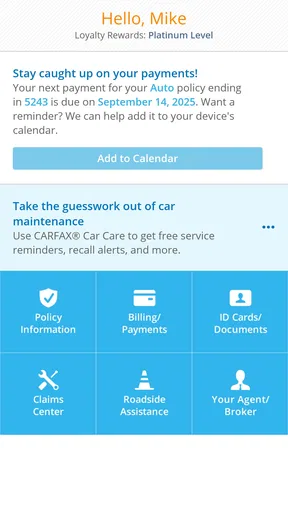
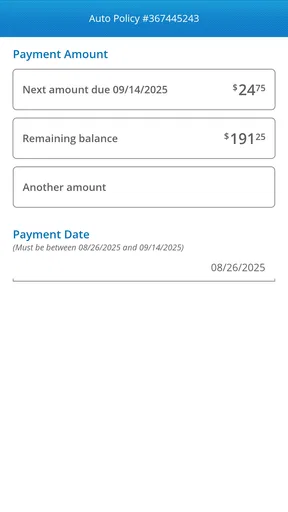

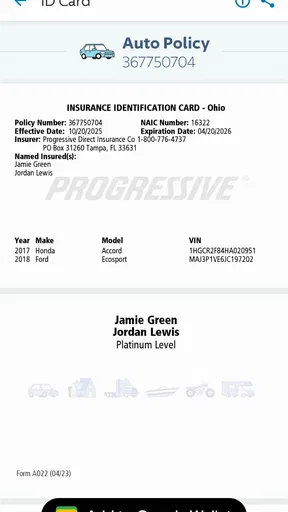
Our Review of Progressive
 Analysis by Appyee
I use Progressive for a much more specific kind of everyday task than general planning: keeping track of my insurance. It is a finance app from Progressive Insurance, and its value is clearest when I want to handle insurance-related tasks without turning every small question into a phone call or a visit to a website. I would think of it as a practical companion to an insurance policy, not a general money manager or a substitute for comparing coverage across providers.
Where users can get stuck
Insurance apps can feel straightforward until a user reaches a step that depends on having the right policy information or account access. That is where I would slow down rather than repeatedly tapping through screens: check that I am using the account associated with the policy I want to manage, and make sure the details I enter match the information I already have. A mismatch can look like an app problem even when the issue is simply that I am trying to access a different account or policy.
Progressive’s role is also worth keeping in mind. The app is designed around Progressive insurance, so it makes the most sense for someone who already has a relationship with the company or is considering one. It is not the place I would go to manage policies from unrelated insurers. If I am still shopping around, I would compare coverage and costs through the relevant providers before treating one insurer’s app as the deciding factor.
Setup checks that save time
Before starting a task, I would first check that I have a stable connection and that the app is current. Progressive is free, and its current version is 3.137; it requires Android 8.0 or later. Those basics matter if an installation or update is not behaving as expected. On iOS, I would check that the device and app are up to date through the usual system settings rather than assuming a failed sign-in means the account itself is wrong.
I would also keep account details handy before beginning anything that may involve a policy. Starting a task while away from the information needed to identify an account can create avoidable friction, particularly if I am trying to finish something quickly. A useful habit is to sign in when I have a moment, confirm that I can reach the relevant account area, and leave detailed policy changes for a time when I can review each step carefully.
Progressive Insurance is the developer, and the app is aimed at a broad audience: its content rating is Everyone. That does not mean every insurance task is equally simple; the type of policy and the reason for opening the app shape what a user needs to do. I would treat it as a convenient access point, while reading any policy information carefully before making a decision that affects coverage.
Recovering a task without making a mess
If something stalls, I would avoid submitting the same request repeatedly. First, I would note what I was trying to do and whether the app showed a confirmation or an error. Then I would return to the relevant screen and check the account or policy details before attempting the step again. That simple pause can help avoid confusion over whether a request went through.
If the app closes or loses connection in the middle of a task, I would reopen it and check the account area before starting over. For an important action, I would not assume it succeeded just because I tapped a button; I would look for a visible confirmation or an updated status. If the information still does not appear right, using Progressive’s normal customer-service route is more sensible than guessing or repeating changes in the app.
That is a practical distinction between an app hiccup and an account question. A slow screen or interrupted connection may be temporary, while a policy detail that looks unfamiliar deserves a direct check. I would not rely on a mobile screen alone to resolve a consequential coverage question; the app can make access easier, but the decision still calls for careful reading.
When the app is not the cause
It is tempting to blame an app whenever an insurance task takes longer than expected, but some delays come from the information or decision involved rather than the software. If I cannot find a policy detail, I would confirm that I am viewing the correct account and policy first. If a figure or term is unclear, I would compare it with the policy documents or contact Progressive instead of assuming the app has changed anything.
For choosing insurance, the app is only one part of the process. A comparison site or direct conversations with more than one insurer may be a better fit when I want to weigh alternatives side by side. Once I have selected Progressive, its app can be more convenient for dealing with that insurer than repeatedly navigating a browser, but it cannot make a coverage choice on my behalf.
Who gets the most from it
I think this app is most useful for people who already use Progressive and want a mobile route for insurance tasks, especially when they prefer checking an account on their own schedule. It can also suit someone who is considering Progressive and wants to explore the company’s digital experience. Progressive has an average rating of 4.6 from around 235,000 ratings, with roughly 36,000 written reviews, and more than 10 million installs. That level of adoption suggests many people use it, though ratings alone cannot tell me whether a particular policy or task will suit an individual.
A realistic use case is a driver checking an insurance matter between errands. I would open the app when I have a few quiet minutes, confirm I am in the right account, review the relevant information, and finish only if the next step is clear. If I am rushed, driving, or unsure what a policy term means, I would wait and review it later rather than tapping through a financial decision just to get it done quickly.
The trade-off is focus. A provider-specific app can be handy after choosing that provider, but it is less useful as a broad insurance comparison tool. Someone who wants one place for multiple insurers, or who prefers handling every account on a desktop, may be better served by those alternatives. I would skip this app if I do not have Progressive insurance and have no reason to explore its services.
My practical verdict
Progressive is a free finance app from Progressive Insurance, first released on April 20, 2010. Its long presence and broad use make it an established option, but what matters most to me is whether it fits the way I handle insurance. I would install it for convenient access to Progressive-related tasks, keep my account details ready, and double-check important information before acting.
For everyday access to one insurer, it is a sensible tool. For comparing the whole market, resolving a complex policy question, or managing coverage from several companies, I would use a broader route or speak with the insurer directly. That distinction keeps expectations realistic: the app can make insurance easier to approach, but it does not remove the need to understand the choices behind it.
Have you ever felt like you’re constantly juggling a million things at once, desperately trying to keep everything in sync? Well, let me introduce you to Progressive, an app that’s here to make your life a whole lot easier. Imagine having a personal assistant right in your pocket, ready to help you tackle your daily tasks with finesse and flair. Let’s dive into what makes this app a game-changer.
Getting Started with Progressive
First things first, installation is a breeze. Whether you’re rocking an Android or iOS device, Progressive is just a quick download away. You can grab it from the Google Play Store or Apple’s App Store, and you’ll be up and running in no time.
Once installed, the first thing you’ll notice is the app’s sleek and intuitive interface. It’s designed with the user in mind, ensuring you won’t get lost in a sea of buttons and menus. The onboarding process is straightforward, guiding you through the key features without overwhelming you. You’ll feel right at home in no time.
Features That Shine
Now, let’s talk about what this app can actually do. Progressive is all about helping you manage your tasks and projects with ease. You can create to-do lists, set reminders, and even collaborate with others on shared projects. It’s like having a Swiss Army knife for productivity.
One of the standout features is the app’s ability to sync across all your devices. Start a task on your phone, and pick up right where you left off on your tablet or computer. It’s seamless and ensures you’re never out of touch with your priorities.
The app also integrates with popular calendar apps, allowing you to see your tasks alongside your schedule. This integration is a real lifesaver, especially when you’re trying to coordinate meetings, deadlines, and personal commitments.
Why You’ll Love Progressive
So, why should you give Progressive a shot? For starters, it’s incredibly user-friendly. You don’t need to be a tech guru to navigate its features, which is a huge plus in my book. The app’s design is clean and clutter-free, making it a joy to use.
You’ll also appreciate the customization options. Whether you want to color-code your tasks or set up recurring reminders, Progressive has got you covered. It’s all about making the app work for you, rather than the other way around.
And let’s not forget about the collaborative features. You can invite colleagues or friends to work on projects together, making it perfect for both professional and personal use. Sharing notes, assigning tasks, and tracking progress has never been easier.
Final Thoughts
In a world where we’re constantly bombarded with information and responsibilities, having a tool like Progressive can make all the difference. It’s your digital ally, helping you stay organized and on top of your game. Whether you’re managing a busy work schedule or planning a family vacation, this app has the tools you need to succeed.
So, if you’re ready to take control of your productivity and streamline your life, give Progressive a try. You might just wonder how you ever managed without it. Happy organizing!
Privacy and Permissions
See what permissions an app requests and how it handles your data.
- Contacts
- read your contacts
- Location
- approximate location (network-based), precise location (GPS and network-based)
- Phone
- read phone status and identity
- Photos/Media/Files
- read the contents of your USB storage, modify or delete the contents of your USB storage
- Storage
- read the contents of your USB storage, modify or delete the contents of your USB storage
- Camera
- take pictures and videos
- Microphone
- record audio
- Wi-Fi connection information
- view Wi-Fi connections
- Device ID & call information
- read phone status and identity
- Other
- view network connections, pair with Bluetooth devices, expand/collapse status bar, full network access, change your audio settings, run at startup, draw over other apps, control vibration, prevent device from sleeping
Verdict
Strengths of Progressive
- User-friendly interface enhances accessibility.
- Wide range of customization options.
- Regular updates with new features.
- Seamless integration with other apps.
- Efficient performance with minimal lag.
Limitations of Progressive
- Occasional bugs in new updates.
- Limited offline functionality.
- Requires frequent login for security.
- Ads can be intrusive for free users.
- Some features locked behind paywall.
Similar Picks in This Category
View All
Google Wallet
Google LLC4.3

Airtel: Recharge, Bank & Loans
Airtel4.0

PayPal - Pay, Send, Save
PayPal Mobile4.2

DANA Indonesia Digital Wallet
PT Espay Debit Indonesia Koe4.5

Binance: Buy Bitcoin & Crypto
Binance Inc.4.8

Cash App
Block, Inc.4.7
Frequently Asked Questions
What is Progressive and what does it offer?
Progressive is a versatile app designed for task management and productivity enhancement. It offers features like customizable to-do lists, project tracking, and deadline reminders. Users can integrate it with calendar apps and enjoy seamless synchronization across devices. Its intuitive interface helps streamline daily tasks, making it ideal for both personal and professional use.
Is Progressive available on both Android and iOS platforms?
Yes, Progressive is available for download on both Android and iOS platforms. Users can find it on the Google Play Store and the Apple App Store. The app is designed to perform optimally on both operating systems, ensuring a consistent experience regardless of the device being used.
Does Progressive offer any in-app purchases or subscriptions?
Progressive offers a free version with basic features, but users can unlock additional functionalities through in-app purchases or a subscription. Premium options include advanced analytics, custom themes, and enhanced collaboration tools. Subscriptions are available on a monthly or annual basis, providing flexibility depending on user needs.
How secure is the data stored in Progressive?
Progressive prioritizes user data security by implementing encryption protocols and regular updates. Data is stored securely and users have control over their information, with options to export or delete it at any time. The app also offers two-factor authentication for added security, ensuring user data remains protected.
Can Progressive be used offline and does it sync data once online?
Yes, Progressive can be used offline, allowing users to continue managing tasks without an internet connection. Once the device is back online, the app automatically syncs data across all connected devices. This feature ensures continuity and reliability, making it convenient for users on the go.
